Zektor HDS4.2 Especificaciones Pagina 10

  • Descarga
  • Añadir a mis manuales
  • Imprimir
  • Pagina
    / 13
  • Tabla de contenidos
  • MARCADORES
  • Valorado. / 5. Basado en revisión del cliente
Vista de pagina 9
16 HDS4.1 Component Video Switch
17HDS4.1 Component Video Switch
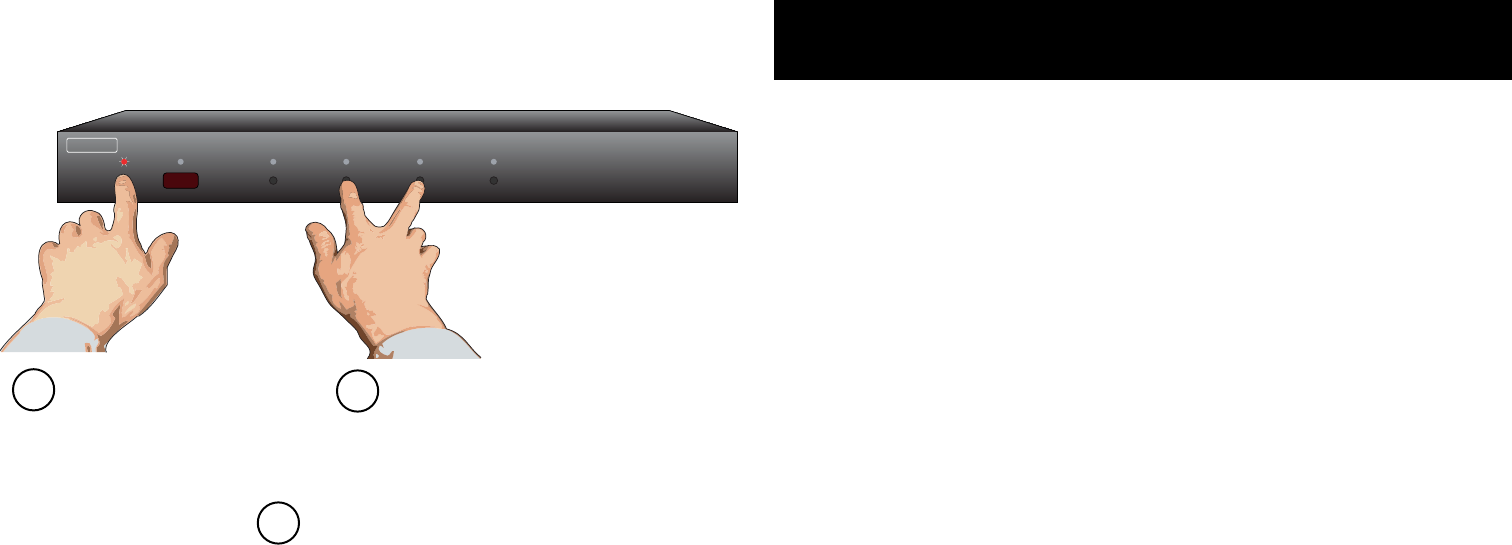
Step 1: Reset All Parameters to Factory Defaults
1 2 3 4
ZE K T O R
Start by pressing and
holding the Power
button...
1
2
...while continuing to hold the Power
button, press and hold both the ‘2’
and the ‘3’ buttons.
After about 4 seconds, the display will flash
indicating all parameters have been restored
to their factory programmed values.
3
Resetting to Factory Defaults
If, for whatever re a son, youd l ike to reset your HDS4.1 back to i t s
factor y condi t i o n, this is ea s i l y done...
Step 1: Reset All Parameters to Factory Defaults
First press and h o l d the Power button
While continuing to hold t h e Powe r Button, press and hold
both the 2 a n d 3 b uttons.
Af ter holdi n g a ll buttons for about 4 s e co nds, the display
will flash in d i c ating all parameters h ave been restored to
their fac tor y progra m m e d values.
1.
2.
3.
Vista de pagina 9
1 2 ... 5 6 7 8 9 10 11 12 13

Comentarios a estos manuales

Sin comentarios